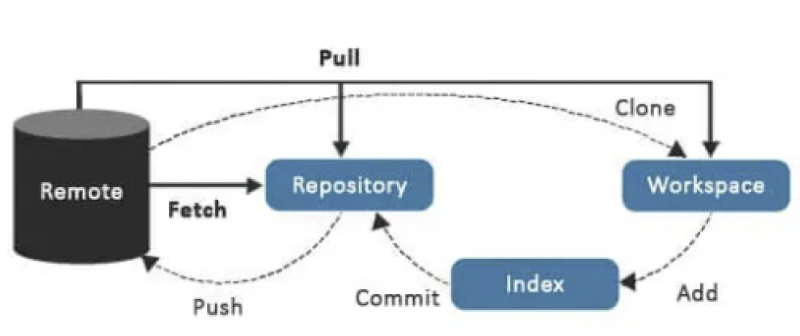
git pull = git fetch + git merge
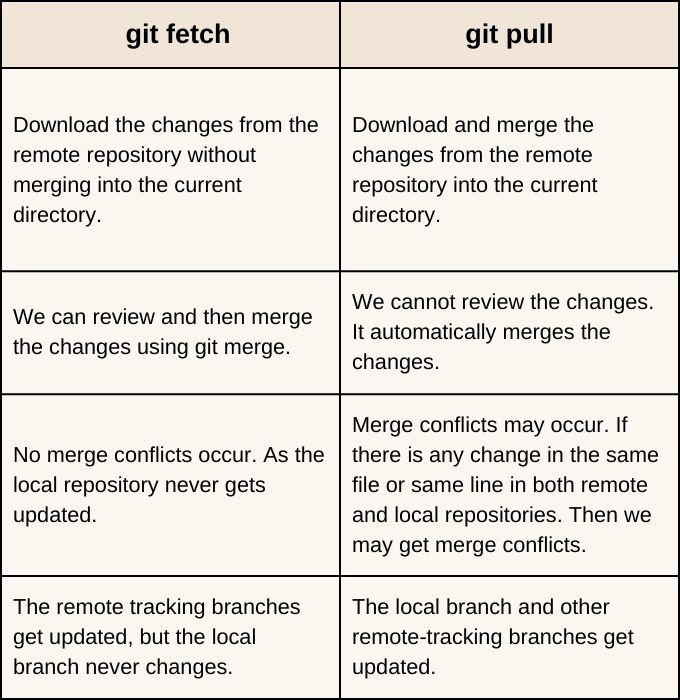
Sometimes the remote repo. has been updated by others and your own progress is behind. You also don’t want to pull as it will replace your current working directory. As a result you:
- first use
git fetch origin/<branch>download the remote repo to local repo - Use
git diff origin/<branch>to see the differences between working directory and the repo. - Use
git add .andgit commit -m "<msg>"andgit commit origin/<branch>to merge the files and manually correct the conflicts marker - Use
git add .andgit commit -m "<msg>"andgit push -u origin/<branch>to update the remote repo